

Most merchants searching "shopify onpage seo" want one thing: a clear, actionable checklist to optimize their product pages, collections, and content without complicated technical changes.
As CEO of Topify, I've reviewed thousands of Shopify sites. The biggest issue isn't lack of content—it's poorly optimized content. The right on-page SEO can double your Shopify organic revenue without touching code or building links.
This guide focuses 100% on on-page optimization—the part you control directly in Shopify's admin.
1. On-Page SEO Fundamentals for Shopify
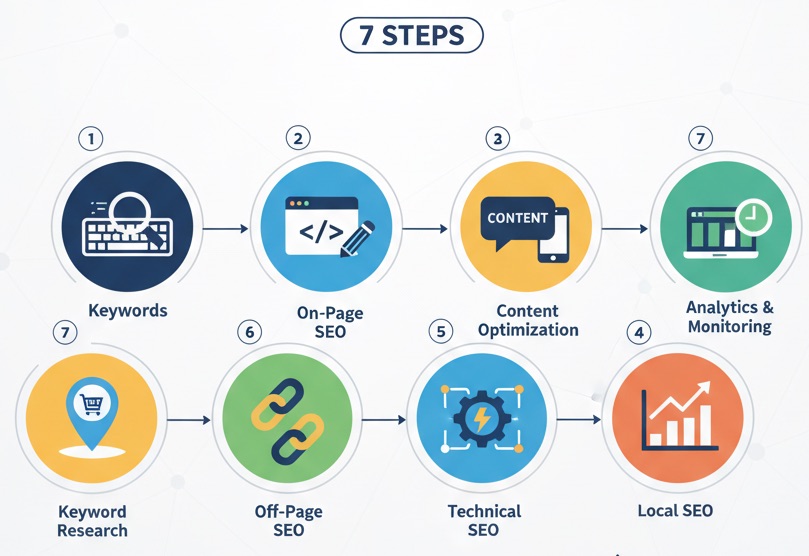
On-page SEO refers to the elements of a page that help Google understand what it's about. It includes:
- SEO titles & meta descriptions
- headings (H1, H2, H3)
- product & collection content
- image optimization
- internal links
- URL handles
- structured data (automatically generated by themes)
Let's walk through the exact steps for each type of page.
2. On-Page SEO for Product Pages
Product pages matter most in Shopify SEO—they generate direct revenue. Here's how to optimize them properly.
A. Product Title (Your H1)
- Include the main keyword, but keep the title readable.
- Add 1–2 key attributes: color, material, gender, use case.
- Avoid stuffing or repeating keywords unnaturally.
Example: "Men's Waterproof Hiking Boots – Lightweight Outdoor Shoes"
B. Product Description
- Use 2–4 short paragraphs.
- Add bullet points for features & benefits.
- Include questions customers ask ("Is it waterproof?", "How heavy is it?").
- Incorporate keywords naturally—Google understands synonyms.
C. SEO Title & Meta Description
Edit at the bottom of the product page under "Search engine listing."
- SEO title: 50–60 characters
- Meta description: 140–160 characters
D. Product Image Optimization (On-Page Must)
- Use descriptive file names (e.g.,
mens-waterproof-hiking-boots.jpg). - Add descriptive alt text.
- Compress images to < 250 KB.
E. Internal Links
Add links to:
- related products
- main collections
- helpful blog posts or guides
F. URL Optimization
Use short, clean handles like:
/products/waterproof-hiking-boots
3. On-Page SEO for Collections
Collection pages often rank faster than product pages because they match category-level search intent.
A. Collection Title
Keep it simple and keyword-focused:
Example: "Men's Hiking Boots"
B. Collection Description
Add 100–300 words of helpful content:
- what the category includes
- who it's for
- important features (materials, sizing, durability)
- seasonal notes (winter/summer options)
C. SEO Title & Meta Description
Edit under "Search engine listing":
- SEO title: category keyword + brand optional
- Meta description: category overview + value
D. Collection Image Alt Text
Describe what's pictured—don't skip this step.
E. Internal Links
- link to high-value products
- link to related collections
- link from blog posts to collections
4. On-Page SEO for Shopify Blog Posts
Blogs help target informational keywords and support collection/product rankings.
A. Blog Title (H1)
Include your main keyword but write for humans.
B. Subheadings (H2 / H3)
- break text into sections
- use keywords naturally
- answer common questions
C. Internal Links
- link to relevant product pages
- link to related collections
- link to other helpful blog posts
D. Image Optimization
- use compressed images
- descriptive file names
- natural alt text
E. SEO Settings
At the bottom → "Edit website SEO":
- SEO title: 50–60 characters
- Meta description: short summary with primary keyword
F. URL Optimization
Keep URLs short:
/blogs/news/how-to-choose-hiking-boots
5. On-Page SEO for Pages (About Us, FAQs, Contact)
These pages strengthen trust and E-E-A-T, indirectly helping SEO.
How to optimize them
- use clear headings
- add internal links to key collections
- include relevant keywords naturally
- add optimized images or team photos with alt text
6. On-Page SEO Copywriting Tips
Google rewards helpful, readable content. Use these principles:
- write for humans first
- use short paragraphs
- add bullet points and lists
- answer questions directly
- use synonyms and related phrases, not repetition
7. How to Track On-Page SEO Progress (With Topify)
After optimizing for "shopify onpage seo", you must measure results.
Topify automatically shows:
- which pages gain impressions after edits
- which keywords start ranking higher
- which pages bring organic revenue
- which pages are declining so you can update them
This makes on-page SEO data-driven instead of guesswork.
8. Shopify On-Page SEO Checklist (Copy & Paste)
- ✅ Optimized product titles
- ✅ Clear product descriptions
- ✅ Collection descriptions (100–300 words)
- ✅ SEO titles & meta descriptions
- ✅ Image file names + alt text
- ✅ Internal links between products, collections, blogs
- ✅ Clean URL handles
- ✅ Helpful blog content
- ✅ Structured data via Shopify theme
Final Thoughts from Udjin
On-page SEO is the easiest and fastest part of Shopify SEO to improve—and you can do all of it inside your admin without a developer.
If you focus on better titles, stronger descriptions, improved images, and strategic internal linking, your store can see measurable ranking and revenue increases within weeks.
And with Topify, you'll always know which on-page updates actually make you money—so you double down on what works.